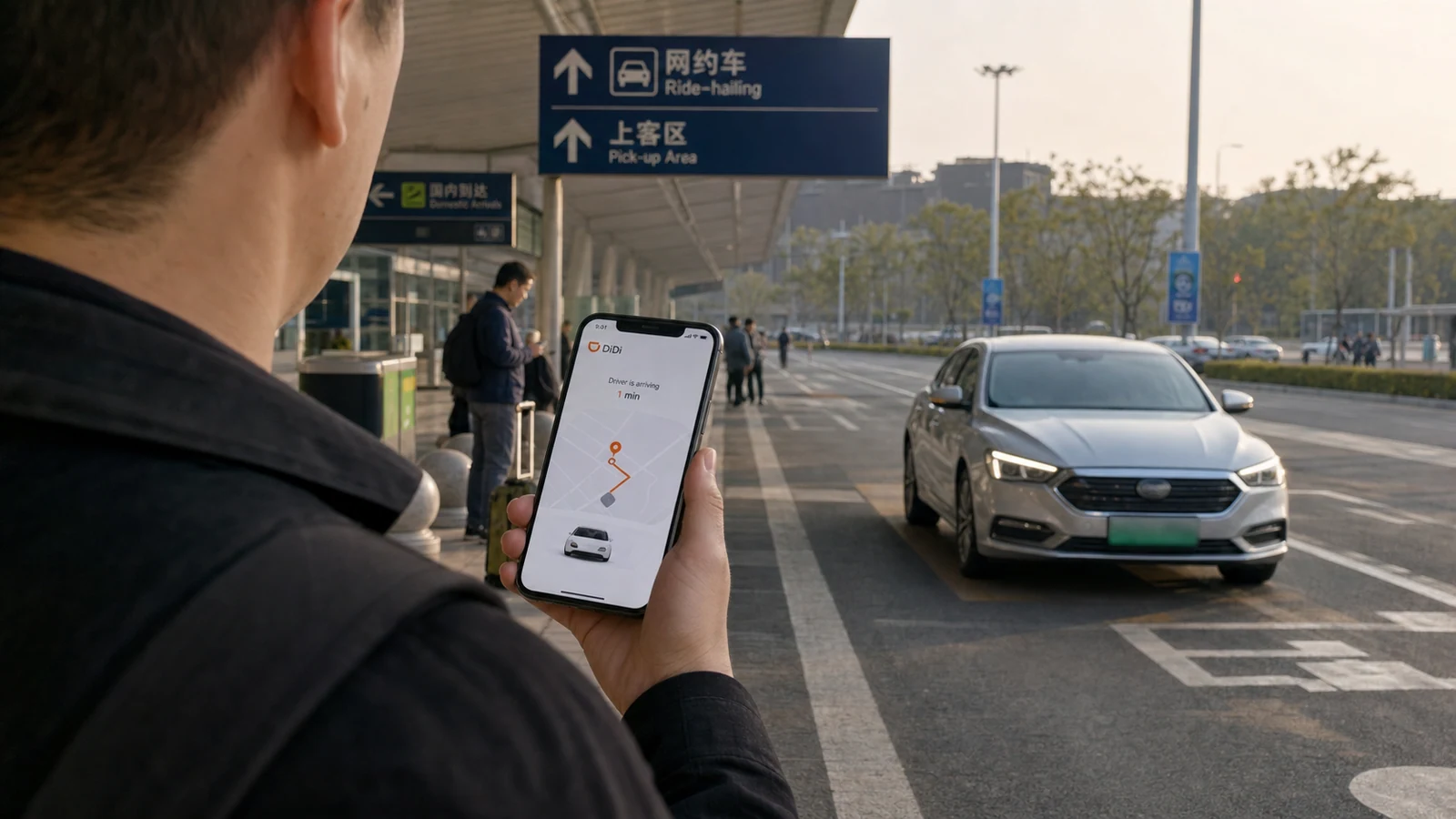
| Question | What a visitor needs to know |
|---|---|
| Can foreigners use DiDi in China? | Yes. Available entry routes include Alipay, WeChat and the DiDi China: Ride Hailing app (called Didi-Greater China in older guidance). |
| Do I need a Chinese phone number? | No for the standalone app. Your foreign number must still receive the verification message. |
| Do I need a Chinese bank account? | No. The standalone app supports international credit cards, although your issuing bank can still decline a live transaction. |
| Is there an English interface? | Yes in the DiDi app. Menu names can move between versions and mini-program routes. |
| What causes the most trouble? | At airports, stations and large complexes, the legal pickup zone and vehicle match usually matter more than the booking button. |
| What is useful to know before an airport arrival? | Know where the designated ride-hailing area is and where to find the official taxi rank if cars are unavailable. |
For airport arrivals: knowing both the designated ride-hailing area and the official taxi rank gives you a simple alternative if cars are unavailable.
Complete these before an airport or railway-station journey:
- A working data connection. You need live data to see driver messages and pickup changes. If you still need connectivity, read the China eSIM guide.
- A number that can receive verification messages. Keep roaming or another reliable SMS method active during setup.
- A working payment method. A saved card can still be declined by the issuer or during the live payment flow.
- The correct destination and entrance in Chinese. Save the Chinese name, address and telephone number—not only the English hotel name.
If you need extra luggage space, wheelchair access or a child seat, check the available vehicle options before booking.
| Route | How to open it | Best for | Watch for |
|---|---|---|---|
| Alipay | Open Transport → Taxi and select DiDi where available, or search for DiDi / 滴滴出行 from Alipay’s home screen. | Visitors who already have verified, working Alipay. | The ride uses the payment and account flow available inside Alipay. |
| Open Me → Services → Mobility/Ride Hailing. | Visitors who already use WeChat Pay. | Menus can differ by account and version. | |
| DiDi China: Ride Hailing app | Install the official app-store listing, register and add payment. | Visitors who want a direct DiDi login and standalone ride history. | Confirm the official publisher and mainland-China service before installing. |
A practical choice: use Alipay or WeChat when that wallet already works and you want fewer new accounts. Use the standalone app when you want a direct DiDi login, clearer separation from the wallet app, or a second route you can reopen independently.
App-store titles and menu labels can change by country, device and version. Before arrival, open your preferred route once and confirm that you can reach the booking screen.
The three routes lead to a similar booking flow but start in different places. Choose the route that best fits the apps and payment methods you already use.
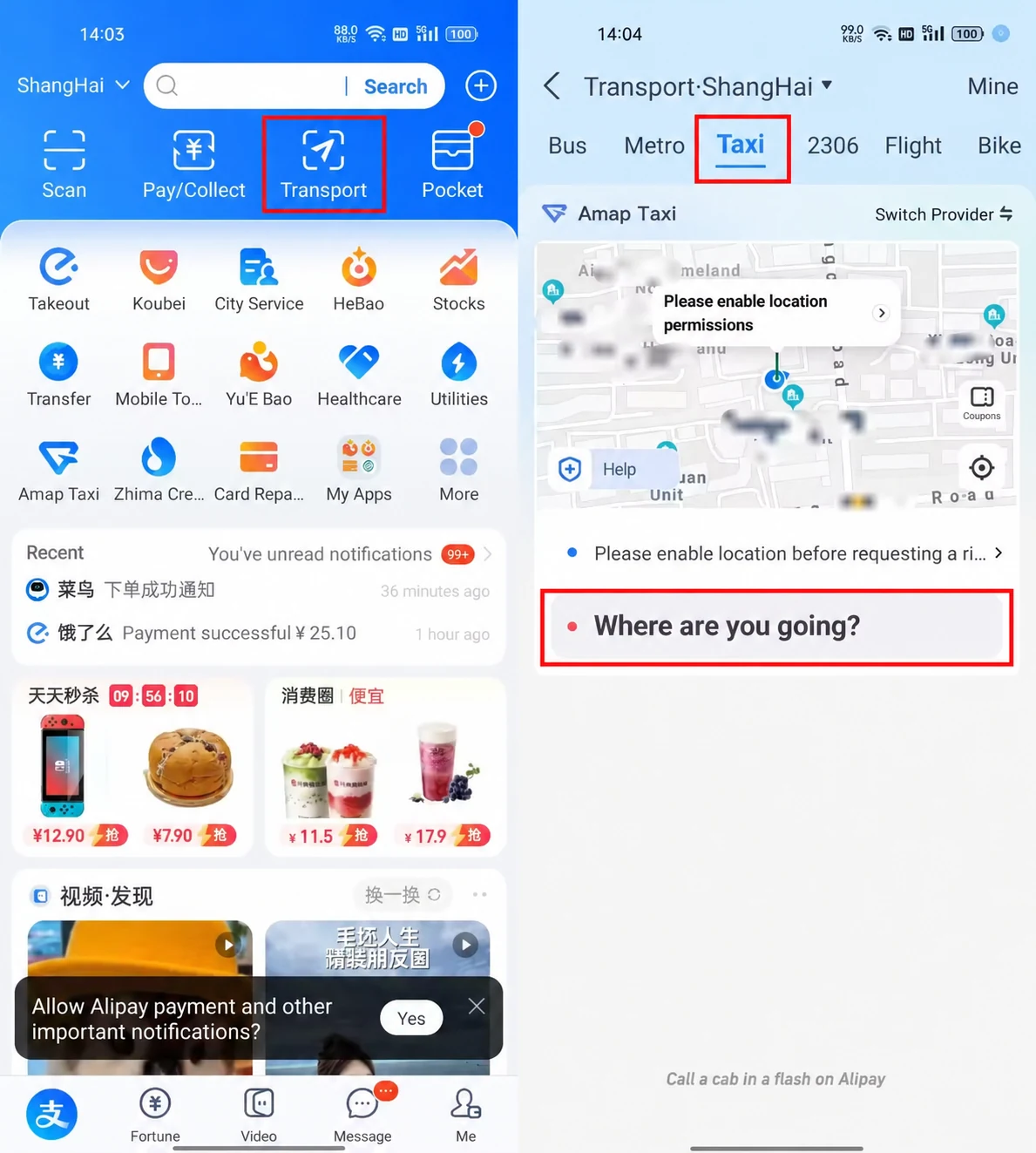
1. Open DiDi through Alipay
- Open Alipay.
- Tap Transport on the home screen.
- Select Taxi.
- If Amap Taxi opens, switch to DiDi if it appears among the available service options. If there is no switch, return to Alipay’s home screen and search for DiDi or 滴滴出行 to find the DiDi mini-program.
- Confirm that the service shown is DiDi, then check the pickup point and enter your destination.
About this screenshot: it shows Amap Taxi, not DiDi. It illustrates the Alipay taxi entry point, not the DiDi booking screen. Follow the switch or search step above to open DiDi; available options and menu labels may vary by account and app version.
Best when: your Alipay account is already verified and its payment method works.
Reopen check: return to Alipay’s home screen and reopen DiDi using the route that worked—Transport → Taxi → DiDi, where available, or the Alipay search.
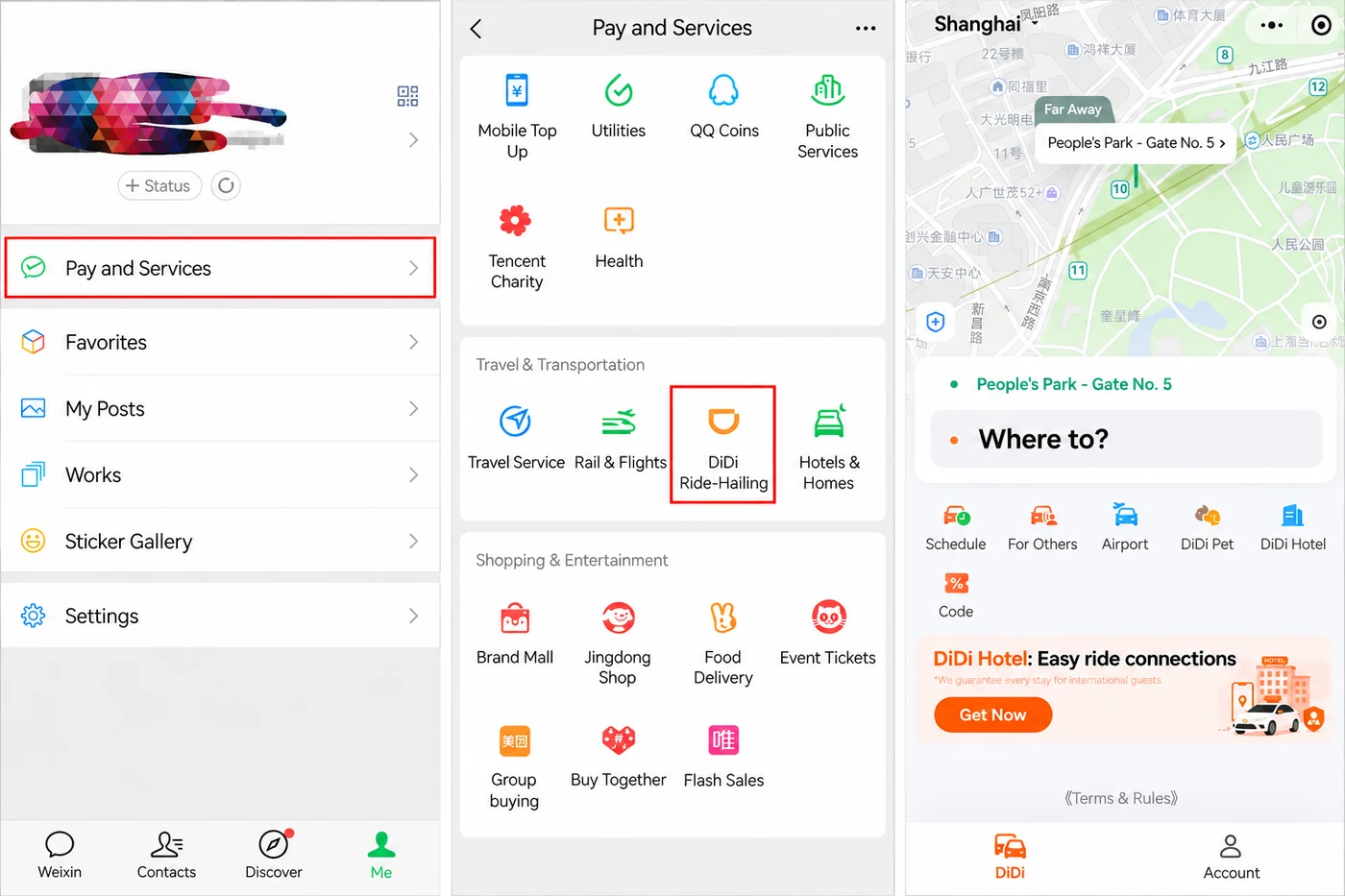
2. Open DiDi through WeChat
- Open WeChat.
- Tap Me → Services.
- Scroll to Mobility or Ride Hailing and open the DiDi service.
- Enter the pickup point and destination.
The grouping and label may differ by account and version, so follow the live options shown under Services.
Best when: you already use WeChat and its payment route is ready.
Reopen check: close the ride-hailing page, return to Me, and confirm that you can find Pay and Services → DiDi Ride-Hailing again.
3. Use the standalone DiDi China: Ride Hailing app
Choose the China app, not just any English-language DiDi listing. The current store name is DiDi China: Ride Hailing, referred to as Didi-Greater China in older guidance. Its official listings explicitly cover mainland China and Hong Kong and describe an English interface, foreign-number registration and international-card support. You do not need the international app simply because you want to use DiDi in English.
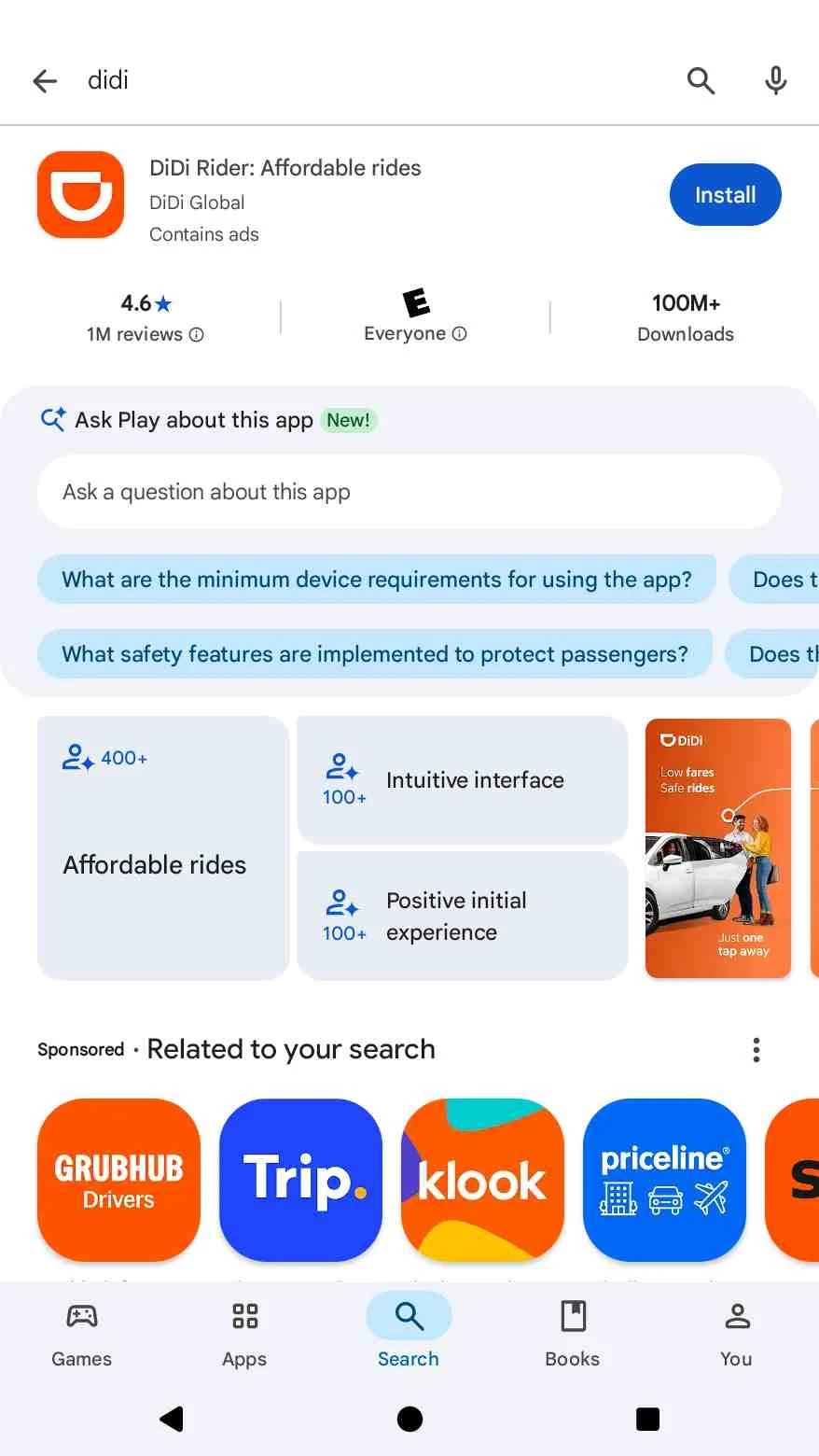
DiDi Rider: Affordable rides is a different app. This guide has not verified that it can book rides in mainland China. DiDi’s Australia help page says a DiDi-Greater China account can sign into DiDi-Rider, but account sign-in compatibility does not establish mainland-China ride availability. For a trip to mainland China, use the China app linked below.
- Install DiDi China: Ride Hailing from its official iPhone App Store listing or Android Google Play listing.
- Register with a mobile number that can receive verification messages.
- Switch the interface to English if needed.
- Add a supported payment method and locate ride history and in-app support.
- Enter the pickup point and destination from the app’s main booking screen.
Screenshot note: the app-store and sign-in images below show the international DiDi Rider app, not the China app named in these steps. They are interface references only; use the official China-app links above for installation.
Best when: you want a direct DiDi login, independent ride history, or a backup that does not depend on opening Alipay or WeChat first.
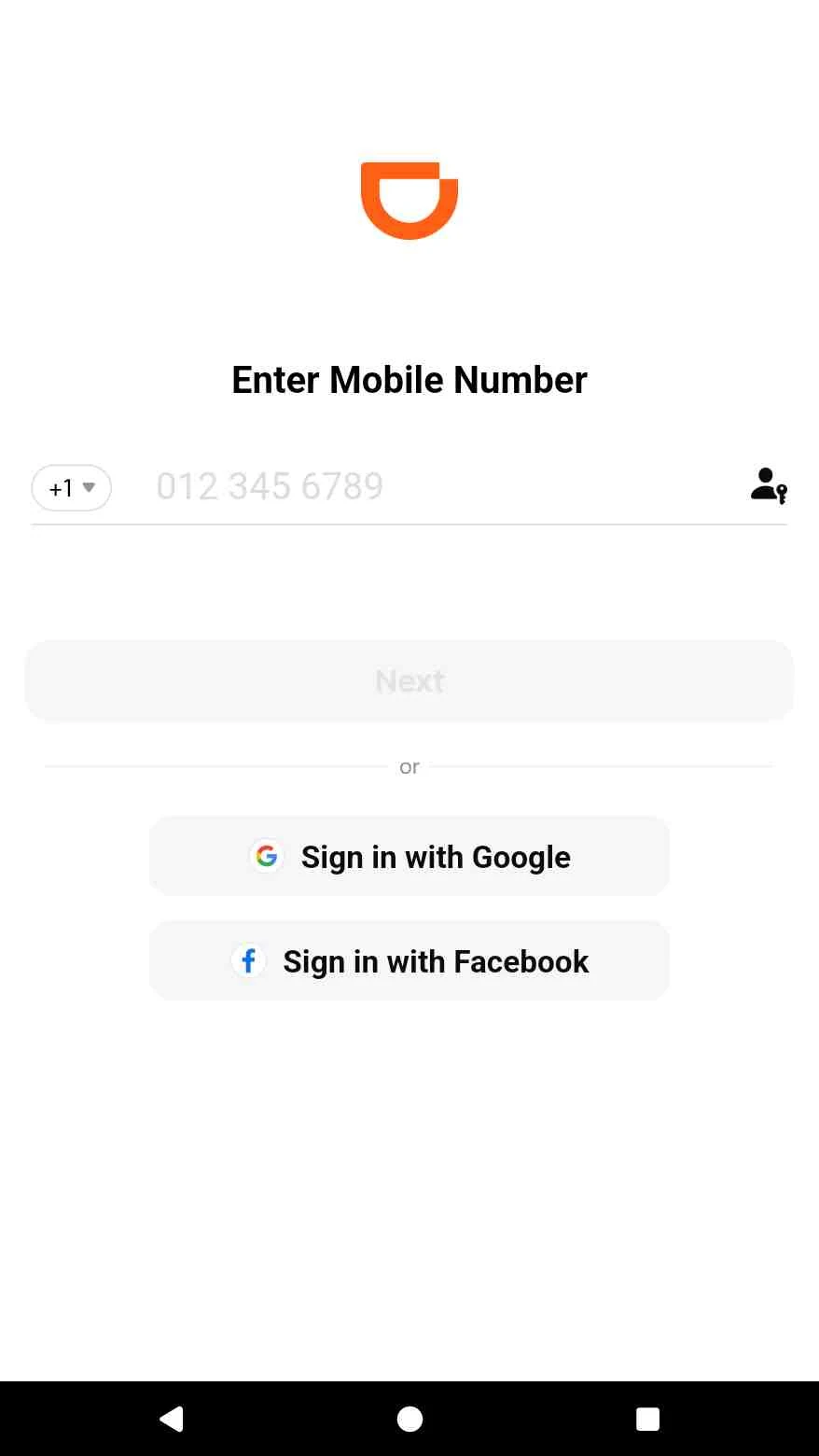
Reopen check: close the app completely, reopen it on mobile data, and confirm that you remain signed in and can reach the booking screen.
Practical recommendation: use the wallet route you already trust as your primary option, then keep the standalone app or the other wallet route ready as a backup. Menu names can vary by account, device and version, so prioritize the live labels shown on your phone.
1. Register with a reachable phone number
Select the correct country code, enter your number and complete verification. Keep the SIM or eSIM configuration that receives the message available for the trip.
Verification codes are used only to sign in; your driver does not need this code.
2. Switch the standalone app to English
Current Shanghai government guidance gives this route:
- Open Me.
- Choose Settings.
- Open General.
- Select Language → English → Confirm.
Menu labels may change between versions, so follow the current language settings shown on your device.
3. Add payment and check the recovery path
The standalone app supports international credit cards. Add the card before arrival and complete any verification requested by the issuing bank or the app.
- Confirm the cardholder details.
- Make sure the bank allows international online transactions.
- Prepare a second card or a working Alipay/WeChat route.
- Locate the order history, receipt and in-app support area before you need them.
For the wallet setup itself, use How to Pay in China in 2026: Alipay & WeChat Pay.
4. Run a reopen test
Close the app or mini-program, switch away from Wi-Fi, reopen it on your travel data connection and confirm that you can still:
- Reach the booking screen.
- See the saved payment route.
- Find ride history or support.
- Receive a verification message if the service asks again.
This small test catches a hidden setup problem before you are standing on an airport curb.
Before leaving reliable Wi-Fi, save:
- The destination’s Chinese name.
- The full Chinese address.
- Its district and a nearby landmark.
- The entrance, terminal or station exit you actually need.
- The hotel or venue telephone number.
- A screenshot supplied by the hotel or booking platform if it identifies the correct entrance.
An English name can point to the wrong branch or district. A blue GPS dot can also sit on the opposite side of a large building from the road where cars are allowed to stop.
Local Lens pickup rule: the destination answers “where are you going?” The pickup point answers “where can this specific car legally reach you?” Treat them as two separate decisions.
- Open the DiDi route you tested.
- Check the detected pickup point and move the pin to a road where a driver can stop.
- Enter the exact destination and confirm the district, branch or landmark.
- Choose a vehicle category that fits the passengers and luggage.
- Review the live fare estimate, currency and payment method.
- Confirm the request and keep the order open while the driver approaches.
- Use the translated in-app chat if the pickup point needs clarification.
The estimate and available vehicle categories depend on the city, time, traffic and live supply. Treat the price, currency, payment route and cancellation terms shown in the current order as authoritative.
Large hubs may separate taxis, private cars and ride-hailing vehicles across different roads or levels. After a driver accepts, identify the pickup as:
- Hub: the correct airport terminal or railway station.
- Access point: the exit, gate or road.
- Level: arrivals, departures, basement or another floor.
- Meeting marker: zone, bay, pillar or numbered pickup point.
Follow the live order and official signs to the designated ride-hailing area. If the route is unclear, show the pickup details to airport or station staff. Keep the order open because the assigned zone may update after booking.
If you are arriving late, traveling with family or carrying several bags, the official taxi rank or a pre-arranged transfer may require less coordination. See China Arrival Guide 2026: Airport to Hotel.

If the driver calls, first confirm the exit, floor and pickup marker shown in the order. Avoid switching between exits while the car is approaching; send one fixed landmark through the app instead.
| What you need to say | Chinese | When to use it |
|---|---|---|
| I am here. | 我在这里。 | After checking that you are at the pickup shown in the order. |
| I am at Exit X. | 我在X号出口。 | Replace X with the actual exit number or letter. |
| I am next to pillar X. | 我在X号柱子旁边。 | Use the real pillar or bay marker. |
| I cannot speak Chinese. Please message me in the app. | 我不会说中文,请在应用里发消息。 | Moves the conversation into a written, translatable channel. |
If you still cannot meet, check the cancellation terms shown for that order before cancelling or rebooking.
At busy pickup areas, match the license plate, vehicle color and driver details shown in the live order. Some drivers may also ask for the last four digits of the phone number used for the booking.
Payment may be deducted through the route selected for the order. Before paying again in another way, check whether the order already shows a completed or pending charge.
Review:
- The completed route and total.
- Any toll, parking, airport, waiting or cancellation item shown.
- The payment status.
- The receipt and order reference.
Save the receipt until the card or wallet charge is settled. If a charge looks unfamiliar, open the completed order and use its receipt or support entry to review the fare.
In-app payment is the most reliable option for international visitors. Cash availability varies by service and should only be assumed when it appears in the current order.
The verification message does not arrive
Check that you selected the correct country code and that your SIM can receive international SMS while roaming. Avoid requesting multiple codes in quick succession; wait briefly before trying again. If the message still does not arrive, use email verification if the app currently offers it, or access DiDi through an already verified Alipay or WeChat account.
The card is declined
Check whether the card details and billing information are correct, then confirm with your bank that international online transactions and any required 3D Secure verification are enabled. Before retrying, check for a pending authorization to avoid duplicate attempts. If the card still fails, use another supported card or switch to a prepared Alipay or WeChat Pay account.
No cars are available
Wait a few minutes and try another vehicle category, as availability can differ between Express, Premier and 6-Seater services. Check that the pickup pin is on a road where a driver can legally stop. Driver supply may be lower during heavy rain, very early mornings or in remote areas. If the trip is time-sensitive, use the official taxi rank or another prepared transport option.
The driver cancels or cannot reach you
Keep the order open and check the pickup pin, exit, floor and meeting marker. Send one clear landmark through the translated in-app chat instead of repeatedly changing locations. If the driver cancels, the app may begin matching another driver automatically; otherwise, check the order status and any displayed cancellation terms before booking again.
A charge looks wrong
First check whether the amount is a pending authorization or a completed charge. Open the completed order and compare the final fare with any toll, waiting, parking, airport or cancellation items shown. Save the receipt and relevant screenshots, then submit a dispute through the support entry attached to that order. Do not pay the driver again until you have confirmed the existing payment status.
I left something in the car
Open the completed trip in your ride history and look for the lost-item or order-specific support option. Keep the trip reference and describe the item, where you were sitting and when you noticed it was missing. The available contact route and any return arrangement will depend on the current order and city.
For broader recovery steps, open the China Travel SOS guide.
Which DiDi route should I use?
If you already use Alipay or WeChat, their ride-hailing entry points may be the easiest to reopen. If you prefer a standalone app for mainland China, choose DiDi China: Ride Hailing, not the separate international DiDi Rider app. The China app has an English interface.
Can I use an international credit card?
Yes. The official DiDi China: Ride Hailing app listings describe international-bank-card support. If you book through DiDi inside Alipay or WeChat, payment is handled through that wallet’s available payment route instead.
Recent traveler reports describe both successful payments with foreign cards and occasional declines after a card had previously worked. The outcome can depend on the issuing bank, identity verification, transaction checks and the route used. Visa and Mastercard are commonly reported, but no card brand guarantees approval for every account or order. Add your preferred card before arrival, make sure you can complete any bank verification, and keep a second card or wallet route available. See recent traveler discussions on using a foreign card with DiDi and international-card declines in China.
Can I schedule a DiDi ride in China?
Advance booking may appear for some cities, routes and vehicle categories. Check the booking screen available to your account rather than assuming that a scheduled ride is offered. For a time-critical airport departure, compare the live option with an official taxi or a confirmed transfer.
Can I use DiDi from an airport or railway station?
Yes. The ride-hailing pickup zone may be separate from the taxi rank, so follow the live order and official signs.
Does DiDi work in smaller Chinese cities?
DiDi is widely available in major Chinese cities and many popular destinations, but the useful question is whether cars are available at your exact pickup point and time. Supply can be more limited in smaller towns, remote counties, scenic areas and late at night. Check the live booking screen for the location, and keep a hotel-arranged car, official taxi or local transfer as a fallback when the journey is time-sensitive.
Is DiDi always cheaper than a taxi?
Not always—but economy ride-hailing is often perceived as the cheaper option for ordinary urban trips. Many Chinese users share route-specific comparisons on Xiaohongshu, where app-based rides are frequently reported as costing less than street taxis. Treat these posts as user experience rather than a nationwide fare rule: the result depends on the city, route, time and vehicle tier. Rush-hour demand, rain, late-night travel, waiting time, tolls and airport fees can also raise the DiDi quote. Compare the live estimate before booking. DiDi’s practical advantage is price visibility, easier destination entry and a digital trip record—not a guaranteed lower fare.
Can I pay cash?
Sometimes, but do not rely on it. Cash may be available for certain taxi orders, but DiDi Express, Comfort and Premier rides generally use the payment method linked to your account. Only pay cash if it is explicitly shown as an option in the current order. Otherwise, use a linked international card, Alipay or WeChat Pay. Paying through the app also keeps the charge, receipt and support record attached to your trip.
What if I need a child seat, wheelchair access or extra luggage space?
For extra luggage, choose a larger vehicle such as XL or a 6-Seater when it appears in the app, and make sure the vehicle can accommodate both your passengers and bags. Do not assume that a standard DiDi car includes a child seat or is wheelchair-accessible. If either is essential, arrange a vehicle in advance through a provider that explicitly confirms the required equipment or accessibility. For a folding wheelchair or bulky luggage, message the driver immediately after matching to confirm that it will fit.
Where can I find a receipt or support?
Open the completed order and use the receipt or support entry shown there. Keep the order reference until the charge is settled.
- I have installed or verified one DiDi route I will actually use—Alipay, WeChat or the DiDi China: Ride Hailing app—and can reopen it without registering again.
- The phone number linked to that route can receive verification messages, and I will have mobile data in China.
- I have added and, where possible, verified one payment method, with a second card or wallet ready.
- I have saved my first destination’s Chinese name, full address and exact entrance, and checked that the DiDi map pin matches it.
- For an airport or railway-station arrival, I know whether I will use the ride-hailing pickup zone, the official taxi rank or a pre-arranged transfer.
Scope of this example: this is an Australian booking flow in the international DiDi Rider app, not a mainland-China field test. Registering or adding payment in Australia should not be treated as a way to activate mainland-China service in that app.
Author’s note: This walkthrough was recorded in Australia because it was more convenient for the author to register and bind payment in the international DiDi app there; completing that international-app setup while in mainland China was less practical. The screenshots preserve the original interface and booking sequence. Sydney prices, currency, payment options, vehicle supply and cancellation details are examples from this session, not promises about mainland-China availability.
Here is the complete step-by-step walkthrough of using DiDi in Sydney, Australia, organized in sequential order with corresponding screenshots captured during this session:
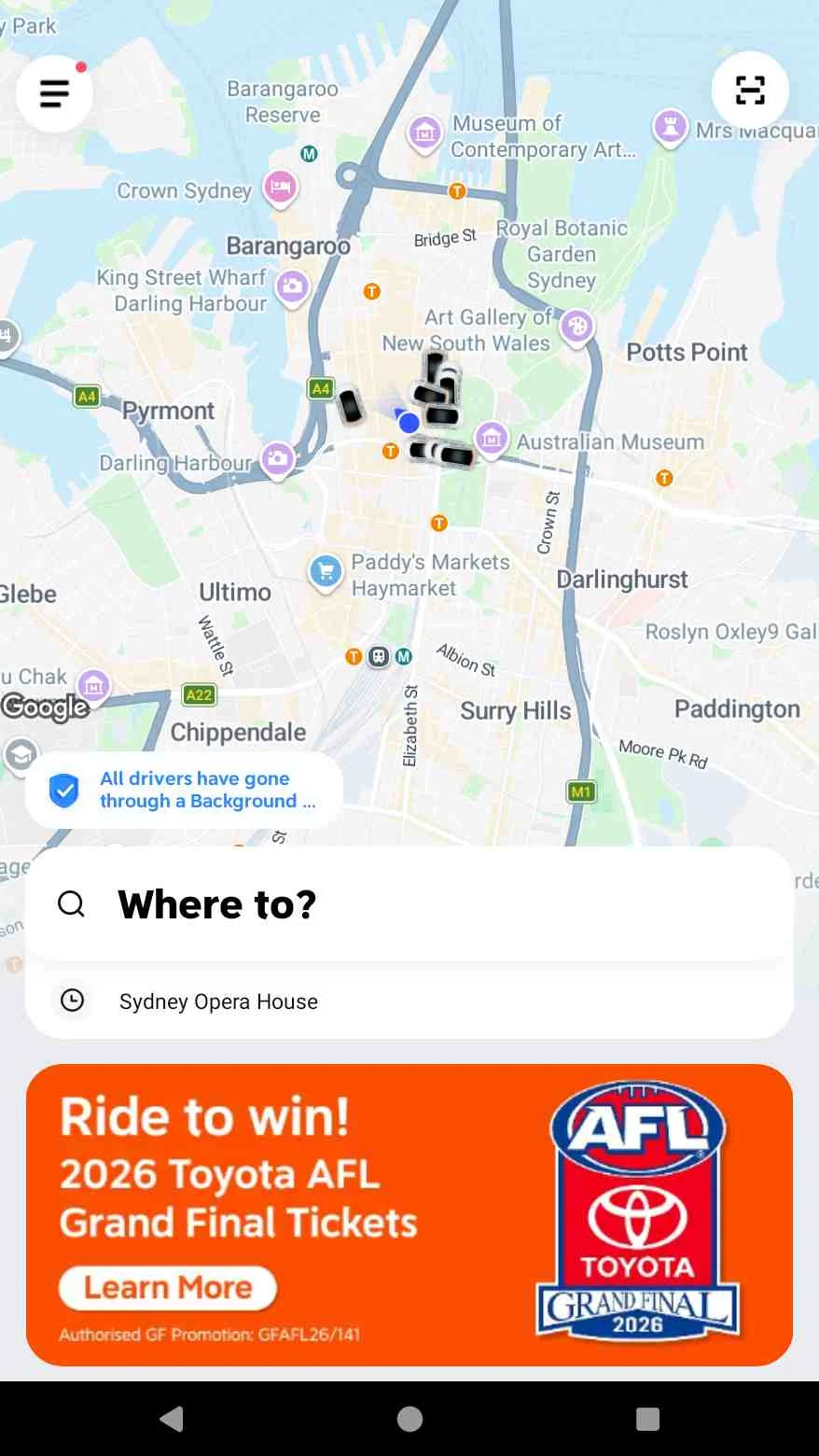
Step 1: Open the App and Confirm Your Pickup Location
- Description: Open the DiDi app. The app automatically detects your location on the interactive map (located on Pitt St, Sydney CBD). Nearby available drivers and vehicles are displayed in real-time.
- Screenshot:
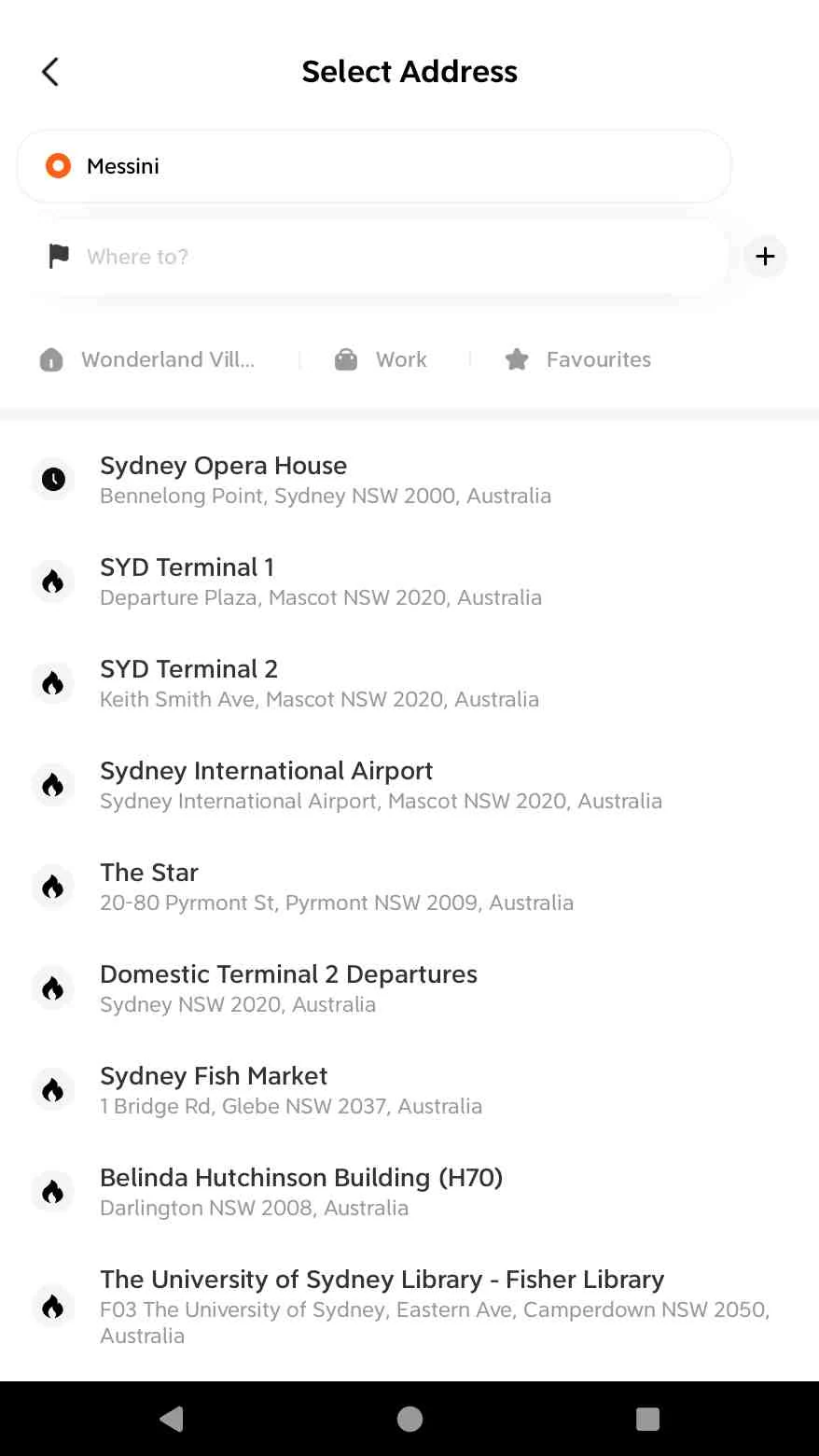
Step 2: Search and Enter Your Destination
- Description: Tap the Where to? search bar. Enter your destination or select from popular Australian landmarks and airports (such as Sydney Opera House, Sydney International Airport, or The Star).
- Screenshot:
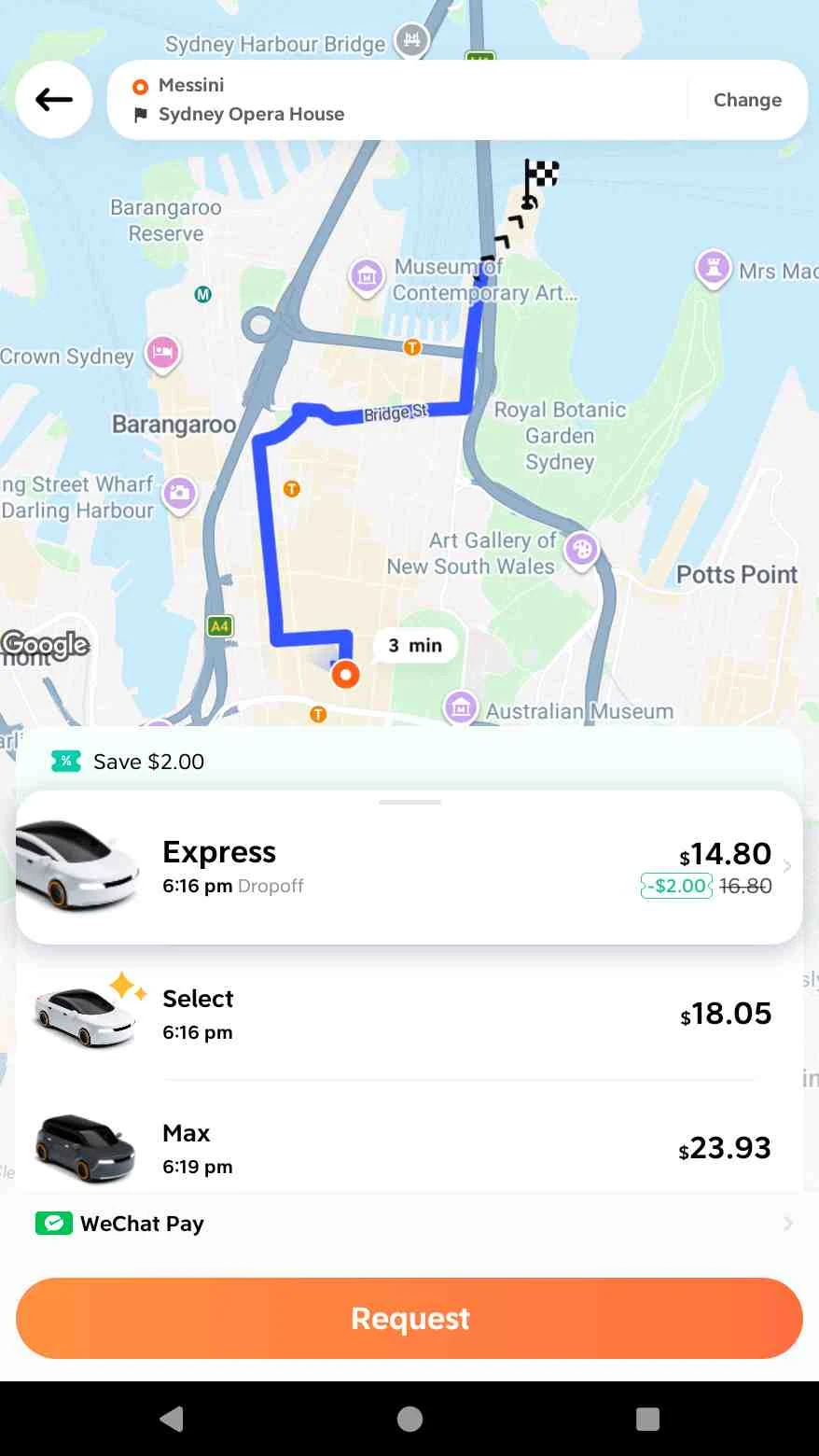
Step 3: Choose Vehicle Tier, Compare Fares, and Verify Payment
- Description: View the route overview, estimated arrival time, and upfront pricing in Australian Dollars (AUD). Choose the preferred vehicle tier:
- Express ($14.80 AUD): Standard, fast, and affordable option for up to 4 passengers.
- Select ($18.05 AUD): Premium experience with top-rated drivers and newer cars.
- Max ($23.93 AUD): Larger 6-seater vehicle for groups or extra luggage.
- Payment: Select your payment method (such as WeChat Pay, Credit/Debit Card, or Apple Pay).
- Screenshot:
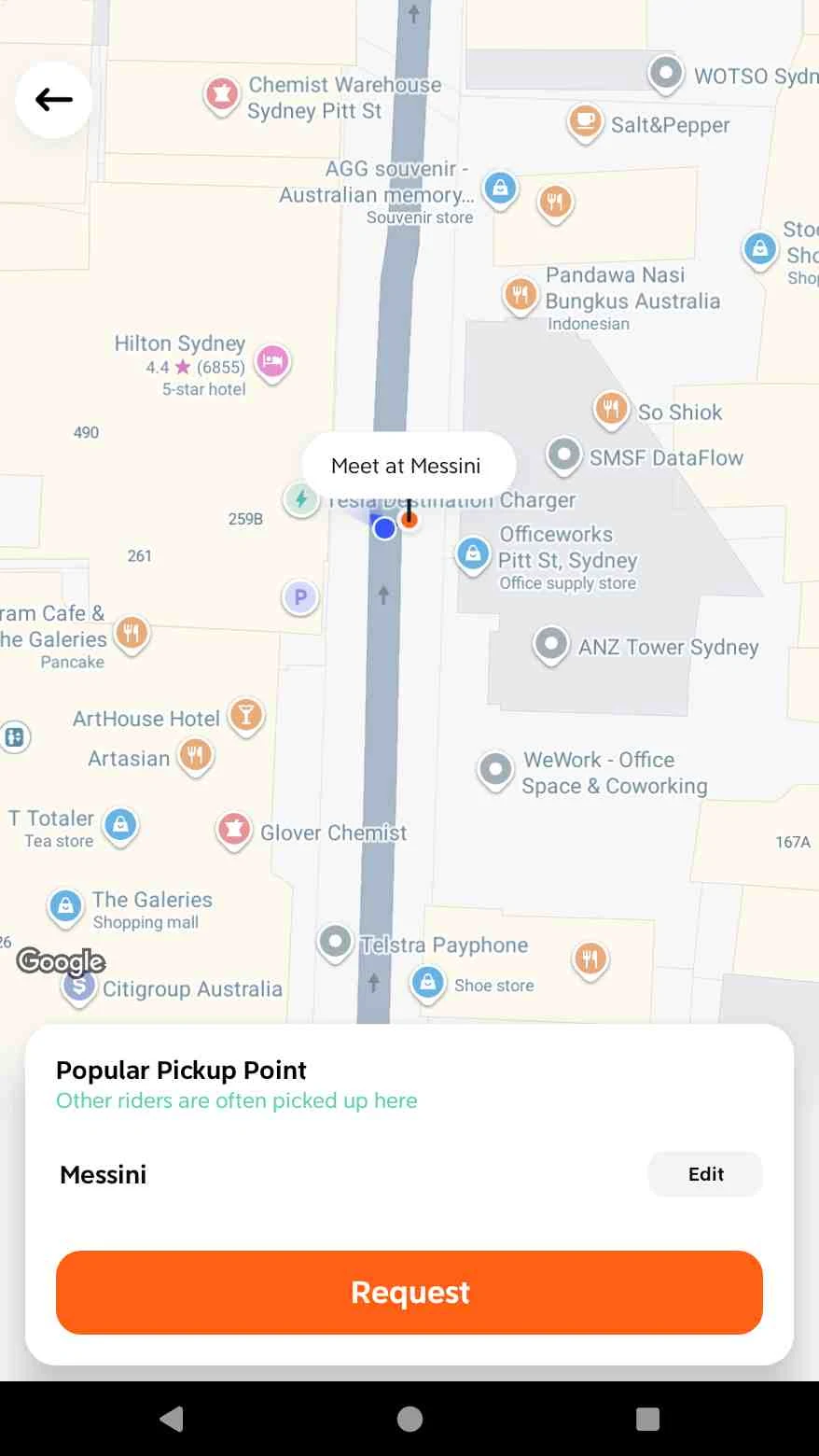
Step 4: Confirm Designated Pickup Point (Popular Pickup Point)
- Description: In busy CBD and metropolitan areas, DiDi recommends a designated Popular Pickup Point (e.g., Meet at Messini on Pitt St) to ensure safe, legal, and smooth roadside boarding. Tap Request to dispatch the booking and match with a nearby driver.
- Screenshot:
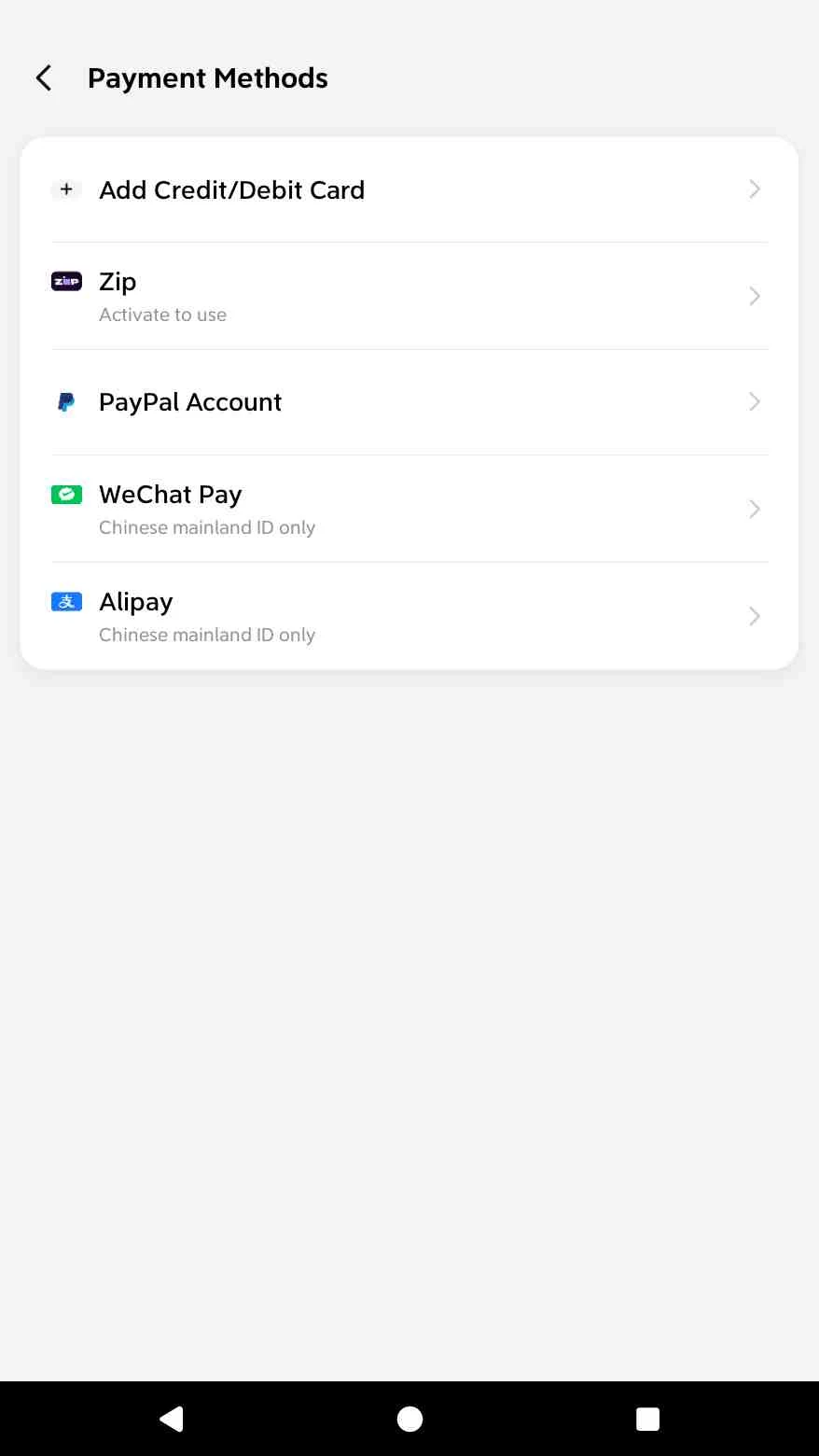
Step 5: Select and Link Payment Methods
- Description: When using DiDi in Australia, a variety of payment methods are supported:
- International Credit / Debit Cards (Visa, Mastercard, AMEX, JCB, UnionPay, etc.);
- PayPal Account;
- WeChat Pay (directly debited in RMB / CNY, convenient for Chinese travelers);
- Alipay (directly debited in RMB / CNY, convenient for Chinese travelers);
- Zip (Buy Now, Pay Later).
- Screenshot:
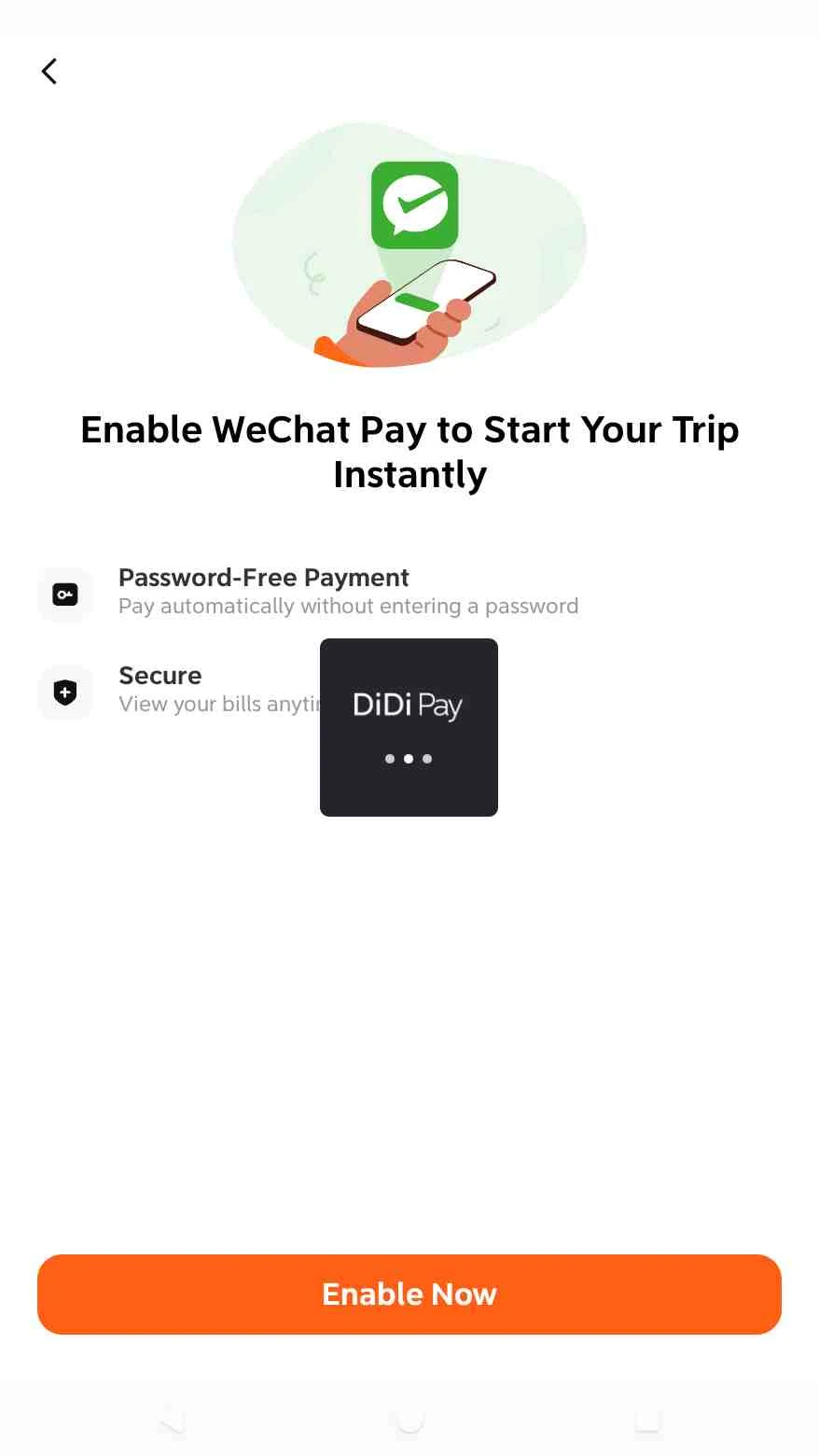
Step 6: Access the WeChat Password-Free Payment Authorization Page (Taking WeChat Pay as an Example)
- Interface Overview: After selecting WeChat Pay from the Payment Methods list, DiDi directs you to the "Enable WeChat Pay to Start Your Trip Instantly" page.
- Key Features:
- Password-Free Payment (Auto-Debit): Fares are automatically deducted from your WeChat Wallet upon trip completion, eliminating the need to manually enter your payment password for every individual ride;
- Secure & Protected: View trip bills anytime within WeChat or DiDi, with the flexibility to manage or revoke authorization whenever needed.
- Screenshot:
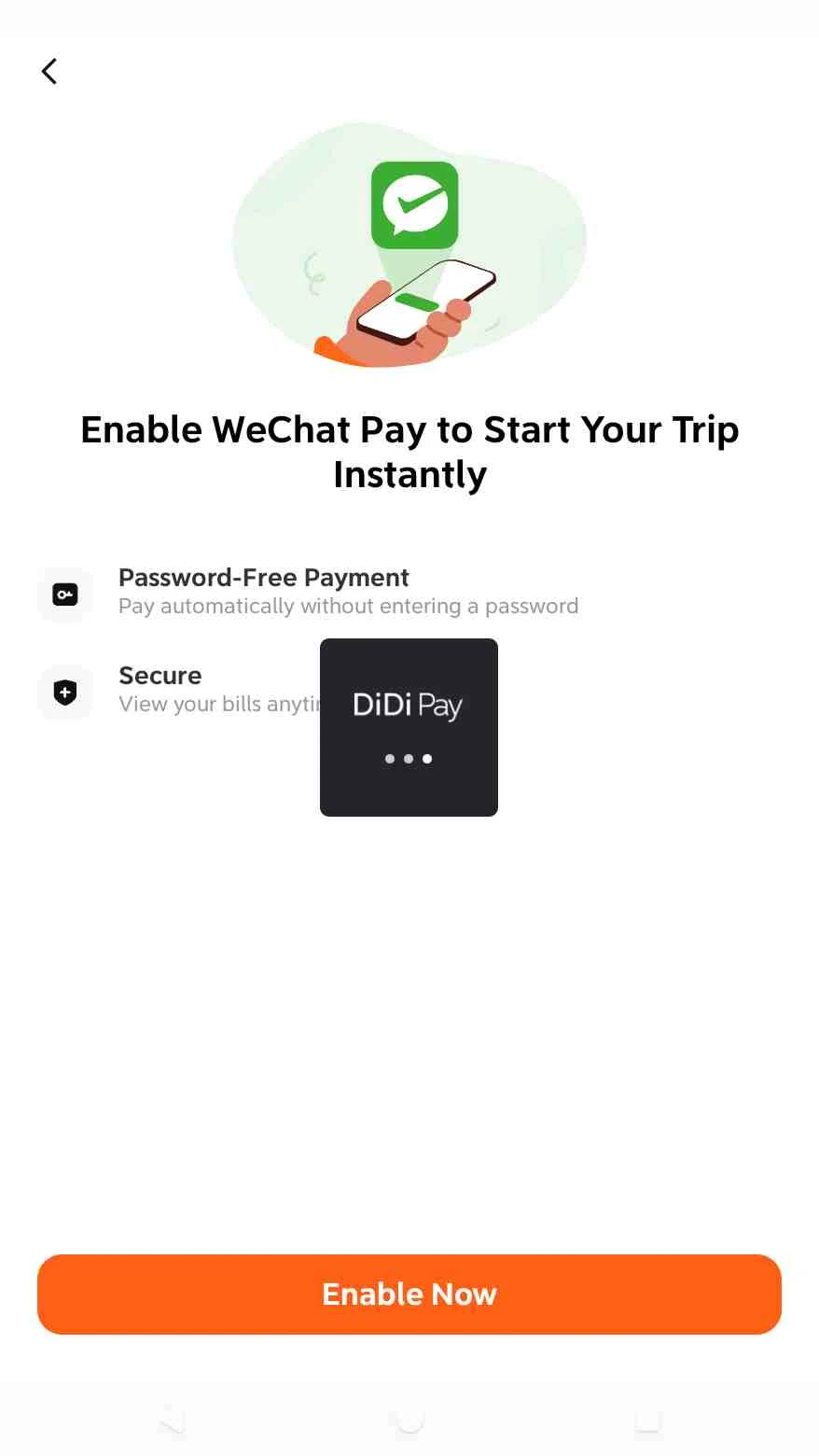
Step 7: Tap "Enable Now" to Initiate Authorization
- Interface Overview: Tap the orange "Enable Now" button at the bottom. The DiDi app will invoke its built-in DiDi Pay SDK and launch the locally installed WeChat app on your device to perform cross-app payment authorization.
- Screenshot:
Step 8: WeChat Pay Agreement Authorization
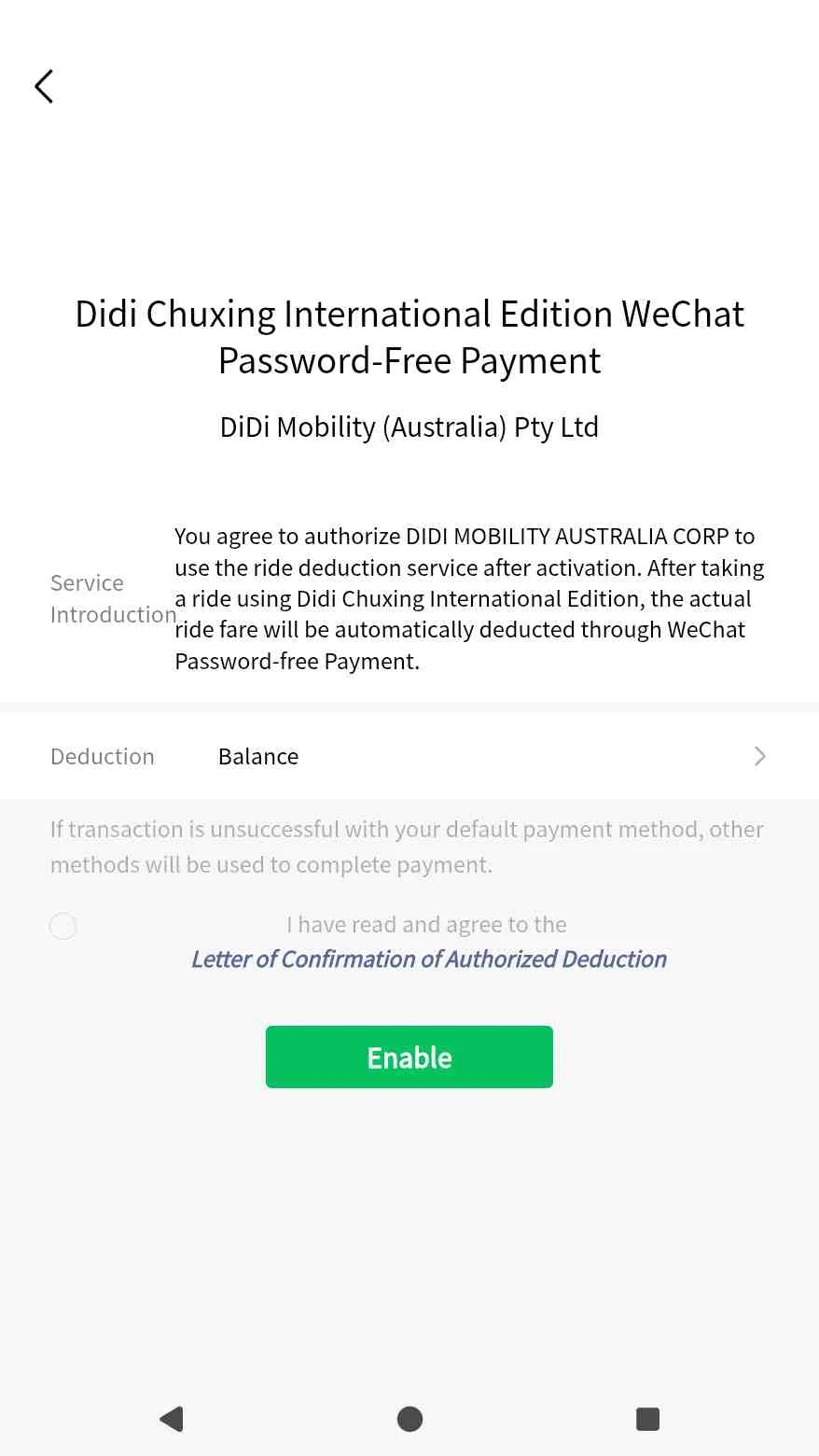
After tapping the Enable Now button, you are redirected to the official WeChat Pay Password-Free Payment Agreement page (Didi Chuxing International Edition WeChat Password-Free Payment):
- Contracting Entity: DiDi Mobility (Australia) Pty Ltd;
- Payment / Deduction Source: WeChat Balance / Linked Debit or Credit Cards (Deduction: Balance);
- Action Steps:
- Check the box to agree to the terms: "I have read and agree to the Letter of Confirmation of Authorized Deduction";
- Tap the green "Enable" button;
- Enter your WeChat Pay payment password to officially authorize and complete the payment setup.
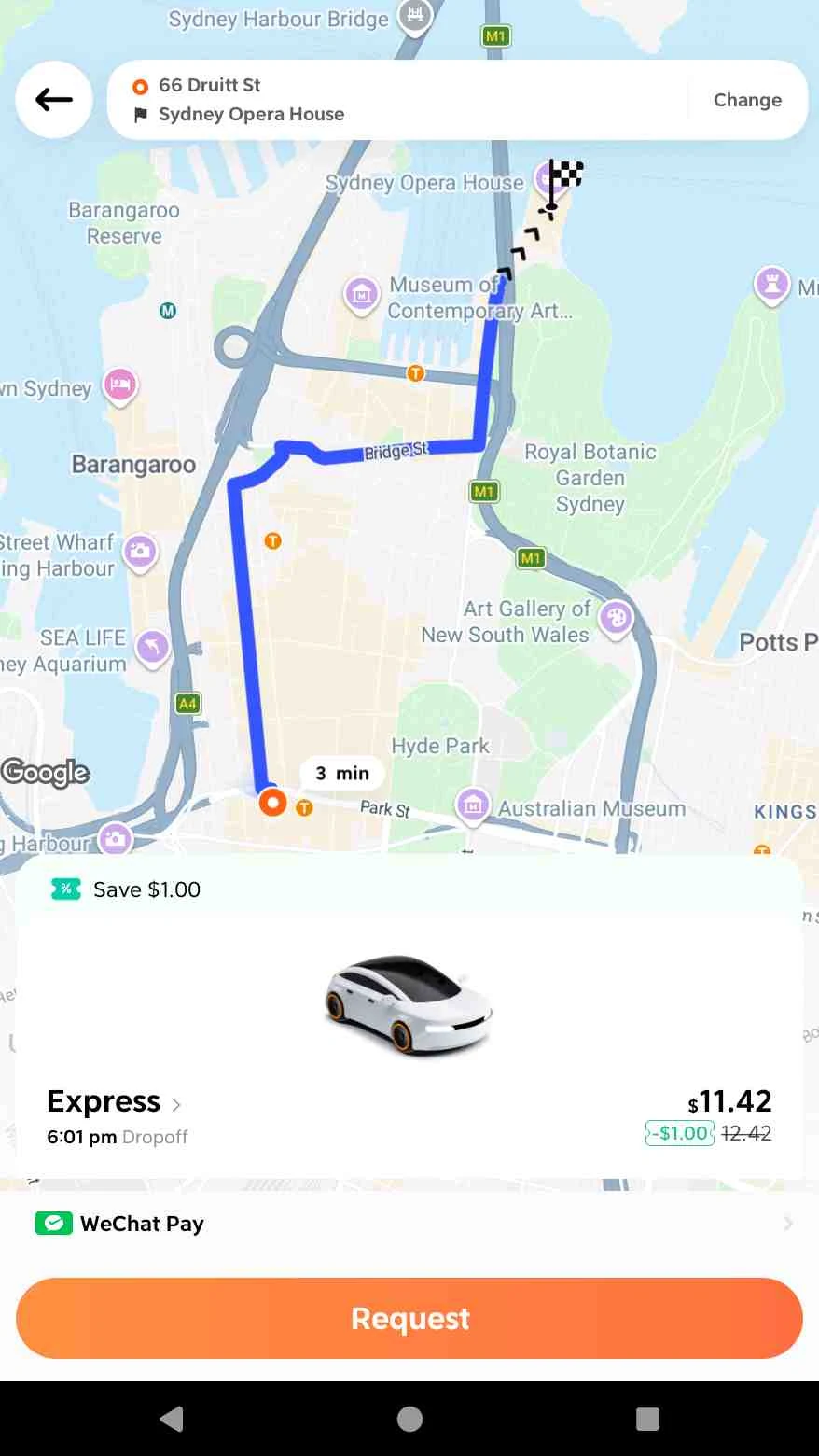
Step 9: Confirm Route, Vehicle Tier, and Fare
Select the destination as Sydney Opera House, and the system calculates and recommends the Express vehicle tier (estimated at approximately $11.42 AUD), with the selected payment method shown as WeChat Pay.
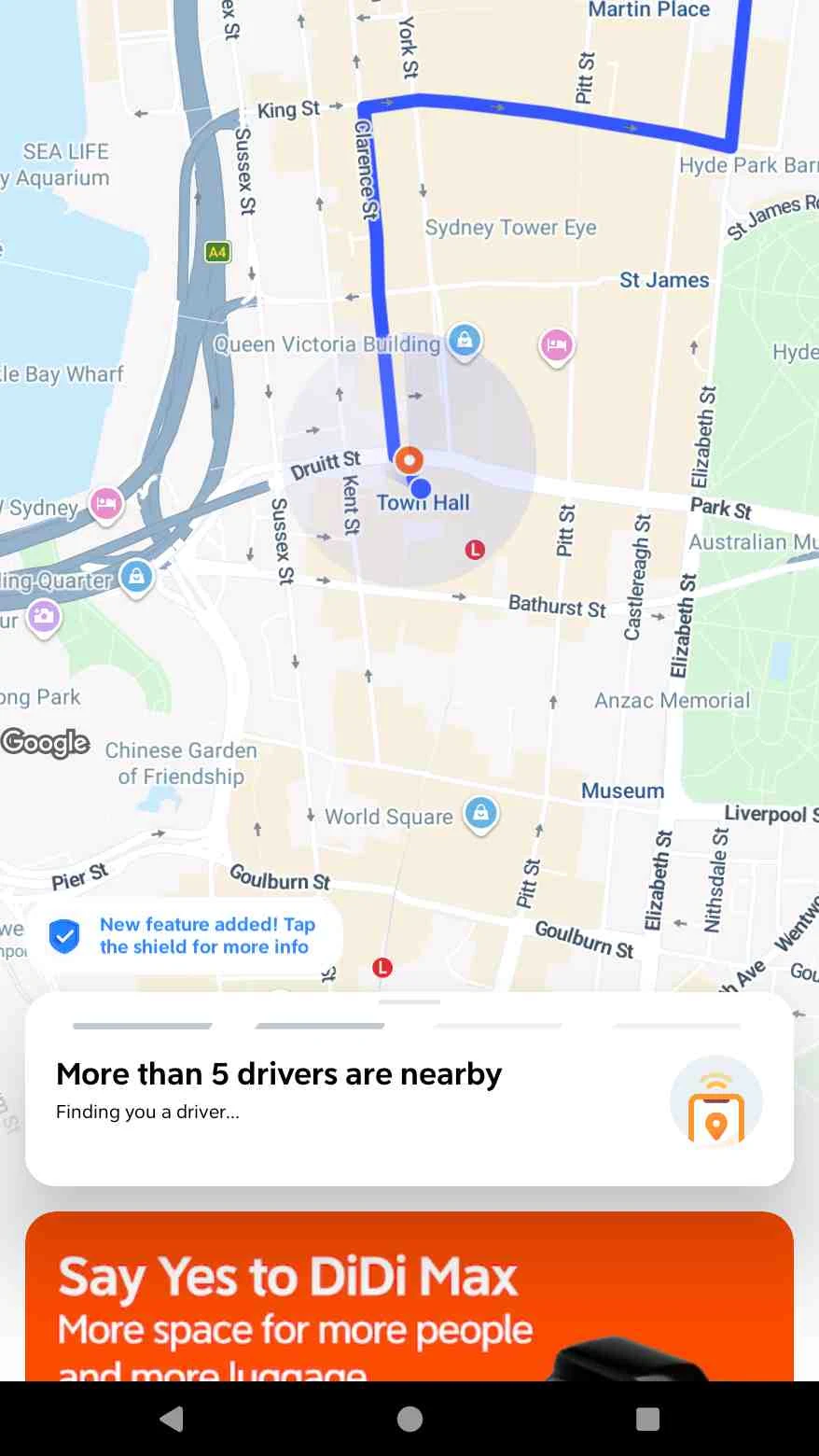
Step 10: Dispatching & Driver Matching (Finding You a Driver)
Tap Request to initiate real-time dispatch. The system enters the driver matching screen, indicating that there are more than 5 available drivers nearby.
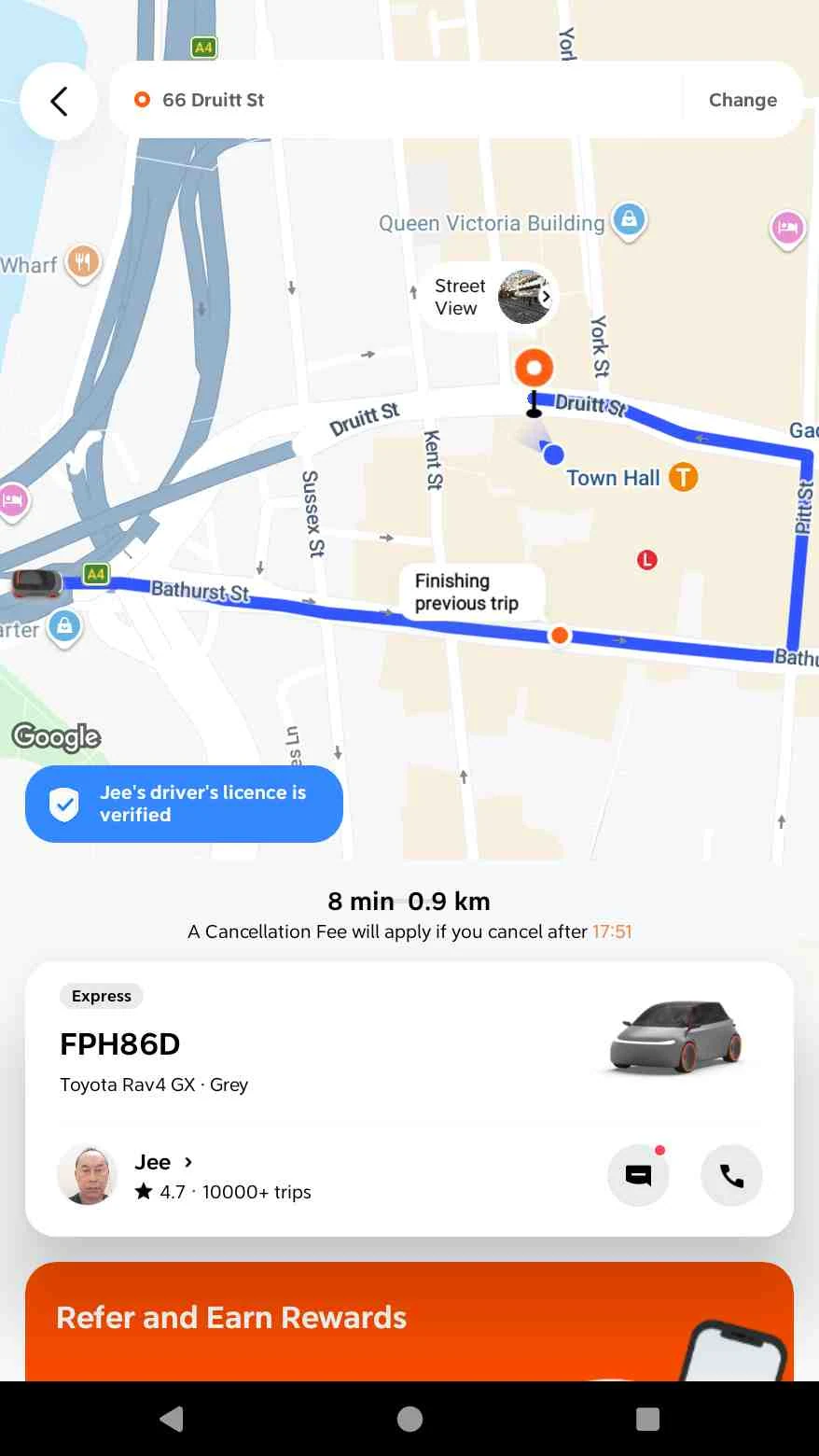
Step 11: Driver Assignment & Trip Details
Driver Jee (Toyota Rav4 GX · Grey · License Plate: FPH86D, Rating: 4.7★) accepts the trip. The screen displays the live vehicle location, estimated arrival time (ETA), and the free cancellation time window.
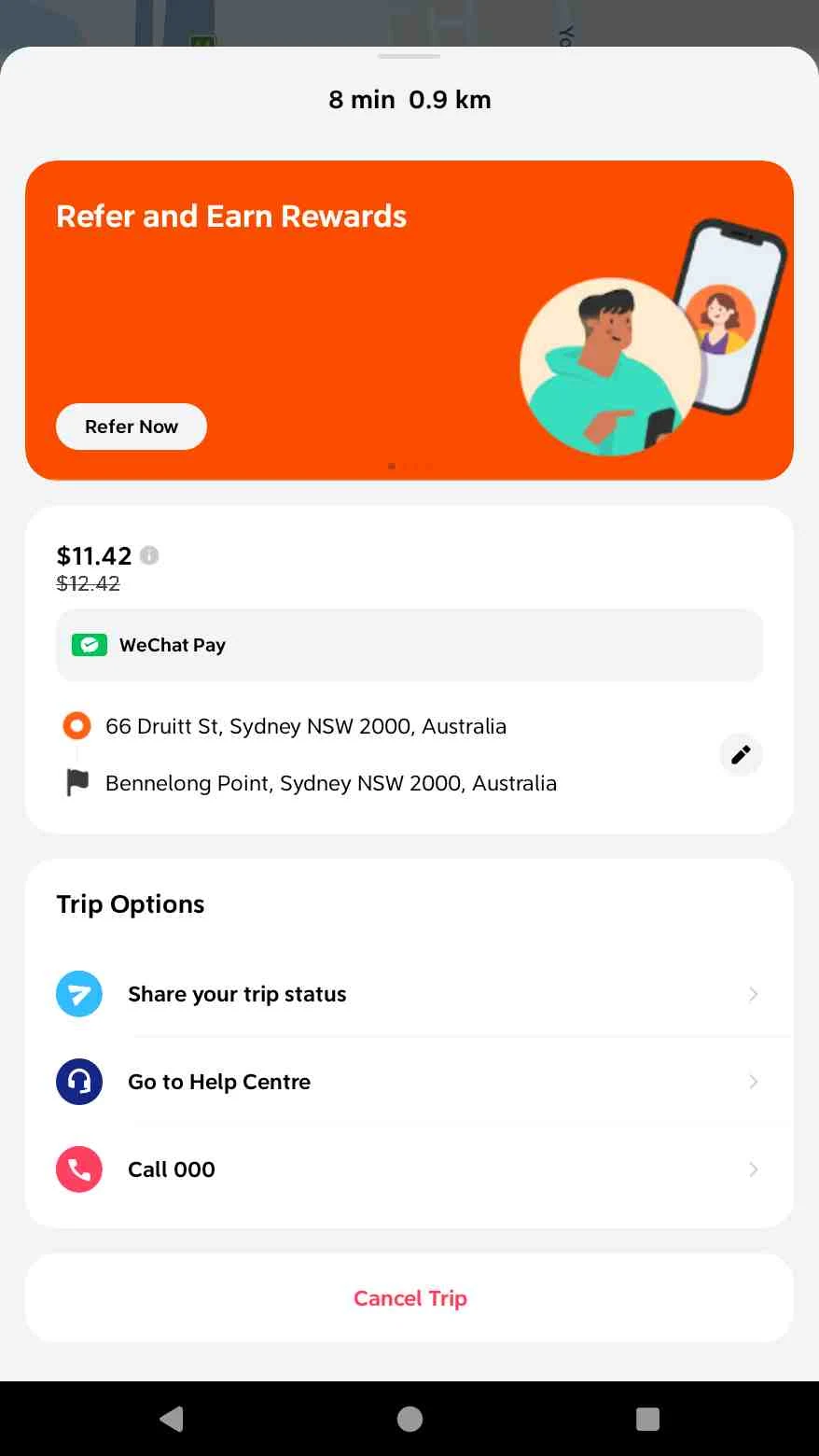
Step 12: Open Trip Menu and Select Cancel (If You Wish to Cancel the Trip)
Within the free cancellation countdown window, swipe up the bottom panel and tap Cancel Trip.
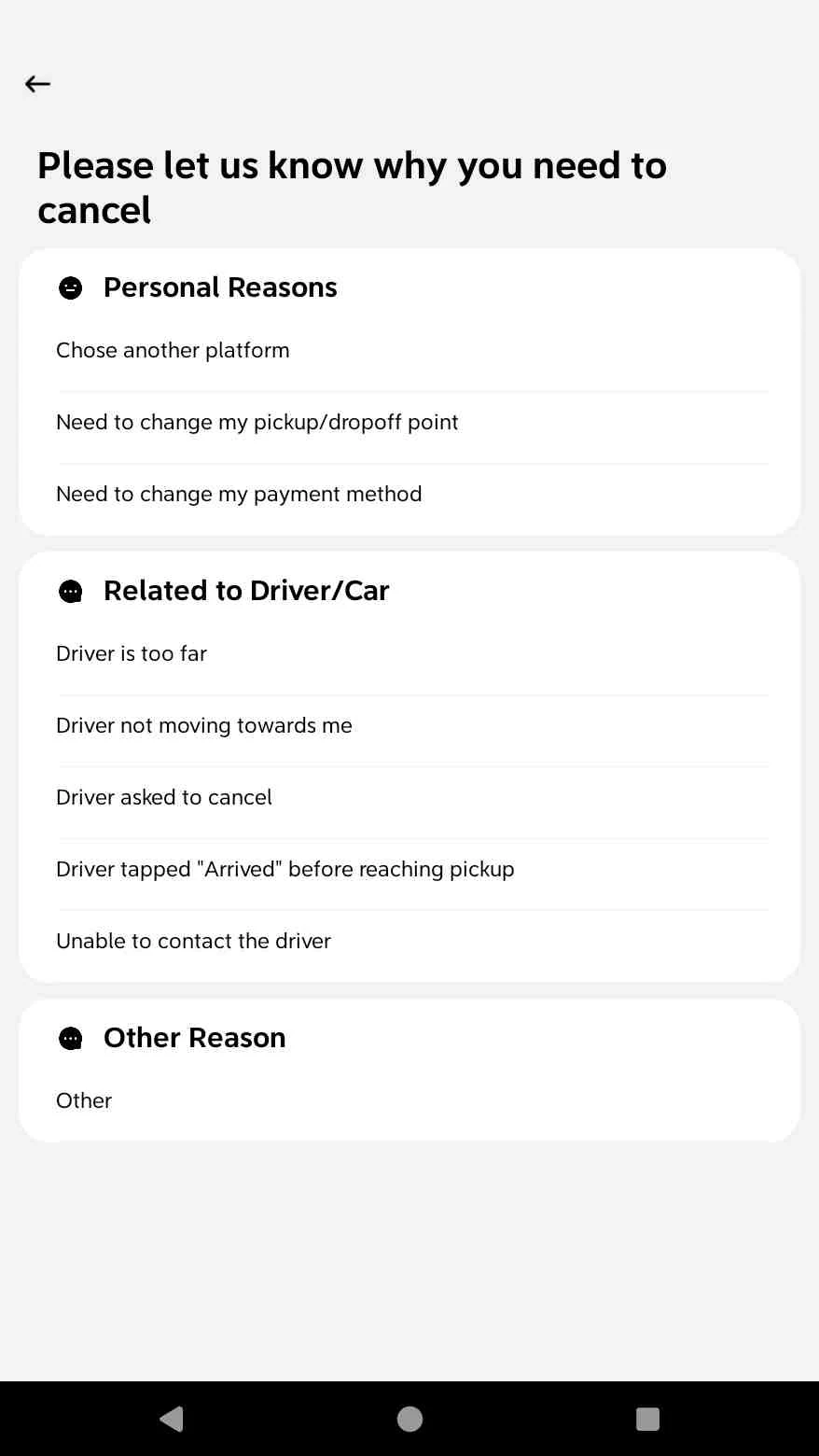
- Select Cancellation Reason and Confirm
Select a cancellation reason (such as changing the pickup or drop-off location) and tap to confirm the cancellation on the confirmation dialog.
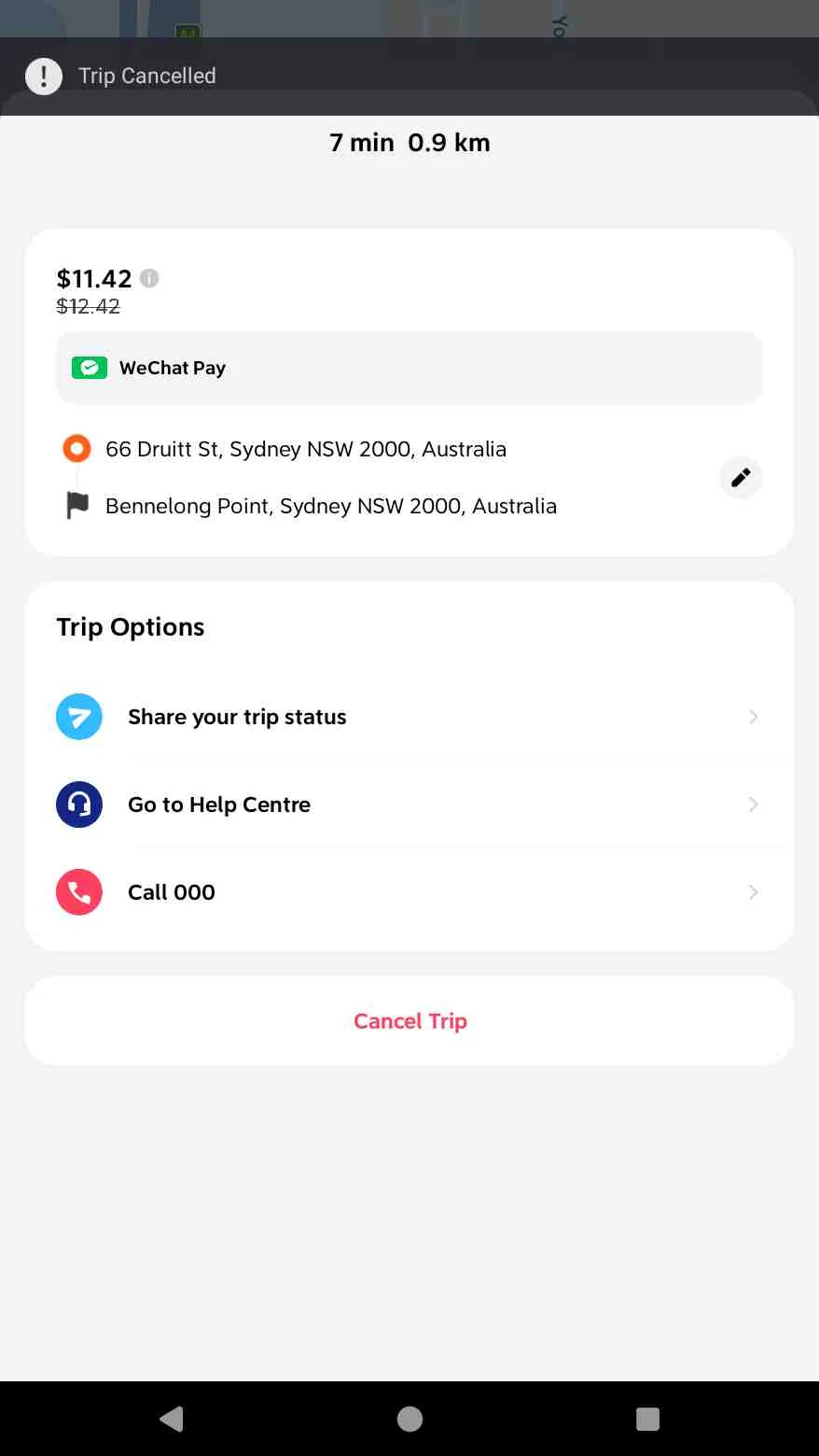
- Cancellation Successful
The trip has been successfully cancelled (a Trip Cancelled banner appears at the top), no cancellation fees were incurred, and the app has safely returned to the completed summary screen.
China-specific account, payment and pickup claims were reviewed on 2026-09-14 against Chinese government traveler guidance and Shanghai government instructions. DiDi’s Australia help material was used only as contextual support for the Sydney interface example, not as evidence of mainland-China availability. Because available services, payment methods, app labels and cancellation terms can vary by city, account and app version, the options shown in your live order should be treated as authoritative.
The step-by-step screenshots document an original DiDi booking flow completed in Sydney. They are included to show the interface and booking sequence; the Sydney prices, currency, PayPal option, vehicle supply and driver details should not be read as evidence of what is available in mainland China.
A mainland-China field test should record the date, city, journey type, access route, device, OS and app version, together with what was—and was not—successfully reproduced. This guide should be updated when that evidence or the cited official guidance materially changes.
Last reviewed: 2026-09-14
Last updated: 2026-09-14
A China-based planner reads every request.